|
6 Steps to Find your B2B Audience on Twitter
by Adam Holden-Bache, Social Media B2B
Repost
We all know Twitter is a great tool for connecting and sharing information. But using it to find the right audience for your business can be a bit difficult, especially in the B2B environment. So how do you go about finding this elusive crowd? Here’s several options using both Twitter search and third party tools to help you find and follow meaningful connections.
1. Determine your keywords and key phrases
If you already have a list, you’re ready to start. If not, go to Google Adwords Keyword Tool, enter in a couple of your main keywords and gather a list of keyword ideas. Include your products, services, industry terms, competitive keywords and anything else that will match you with your potential audience.
After you have your keywords, here’s how to proceed:
2. Search in Twitter by keyword
a. Go to Twitter Advanced Search and search on your keywords and phrases.
b. Do the obvious- review the results and follow anyone interesting.
But then take it a step further:
c. Use the RSS Feed of the results and subscribe to it in Google Reader. Continue to monitor the feed for other interesting people to follow. Then use this feed of information to your advantage to…
3. Optimize your tweets for inbound opportunities
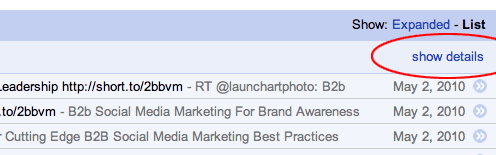
a. In Google Reader, select your Twitter search feed and click the “show details” link at the top right above your feed entries. Note the time of day and day of the week where the most activity is taking place for that keyword/phrase.
b. Write tweets with those keywords/phrases in the copy and schedule them to be delivered at the most popular times (use HootSuite or some other Twitter tool with tweet-scheduling capabilities). This should help you generate interest not only on Twitter but it may also have additional traditional SEO benefits.
c. Write tweets using your keywords as hashtags and send those at the most popular times too. In general, using hashtags consistently will help you connect with those interested in similar topics.
4. Use Buzzom to search Twitter Bios
a. Visit buzzom. Login with your Twitter account and leave the default “Bio” boxed checked under the search field.
b. Search on a keyword or phrase. Or better yet, search for a position or title of a person that usually buys your products or services. Use quotes for an exact phrase match (i.e. “Customer Service Manager”).
c. Review and follow those in the returned results. You can also bulk follow by selecting ALL.
5. Use twellow to search Business Categories
a. Go to twellow and create an account.
b. Search by category and follow.
c. While you’re there, create your own profile and add it to appropriate categories so others can find you.
d. Also try Twellow’s Suggested Users feature to find possible matches.
6. Search and follow by Hashtag
a. Go to blastfollow. BlastFollow enables you to follow Twitter users en masse.
b. Enter in the hashtag of an event, keyword, keyphrase, etc. and click the “GetUsers!” button for a tally of users mentioning that hashtag.
c. Enter your Twitter Name and Password to follow everyone who tweeted that hashtag. Note that as soon as you enter your information and click “Blast!” you’ll immediately start following everyone who tweeted that hashtag. This tool is especially awesome if you are at an event with a unique hashtag. If you are worried about following people you may not want to, go to Twitter advanced search, search by hashtag there and review/follow those listed in the results.
This is by no means a comprehensive list and based on the number of Twitter tools out there I’m sure there’s other options that perform these same functions. But hopefully these steps will provide opportunities for you to find your audience on Twitter. If you have any other methods please feel free to share them in the comments.
|



Leave a Reply