
|
    Professional Email Marketing Solutions |
How to Create a Google Plus Page for Businesses
Author: iseonews
Regardless of what people say, Google+ is an ever-growing social network. Much like Facebook and Twitter, it can be great for your business' exposure and can put you on the map – literally! Getting started with Google+ can be a tricky, especially if you're doing it from a business perspective. Below, we're going to talk about five vital steps that anyone looking to get started with Google+ for their business should follow.
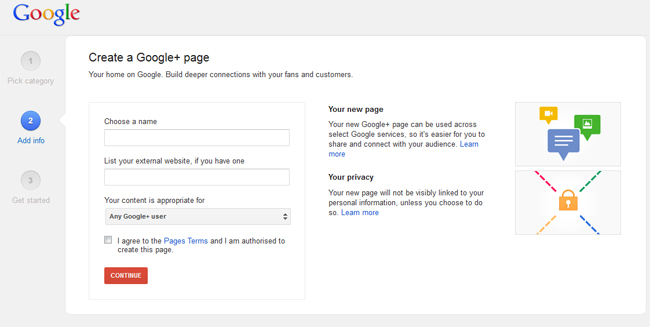
1. Create Your Google+ Page
Before you can do anything, you need to setup a Google+ page. This is easy enough to do, and your first port of call is the Create a Business Page from Google. First off, you'll need to choose what type of business it is you're creating a page for; this will help Google to recommend your business to other Google+ users based on their tastes. Once you've done that, you'll have to input some basic information about your business or brand. It's important that you make this as accurate as possible, because it can be tricky to change later on. Also, be sure to mark which age groups your content is appropriate for. After all, you don't want to fall foul of Google's policies!
Make sure you confirm all the information is correct, then go ahead and accept the Terms and Conditions. Now that your business has a Google+ page, it's time to make good use of it.
2. Customize Your Google+ Page
With Facebook, Twitter and Google+ all allowing for some great customization, barren pages don't look good at all. Customizing your page to make it fit in with your brand and look good on Google+ is important. For example, Maxwell Systems has a customized Google+ Page with personalized content. They don't just post business-specific content; they post funny articles, images, history, current events, and even pop culture material. Don't forget this is a social platform, not just advertising.
Start by adding a profile photo, either a logo or perhaps a photo of your store, then move on to uploading a photostrip. This large photo is shown at the top of your page as people view it. It's important to choose a high-quality image for this to show you're serious about Google+. Inputting extra information, such as your contact details, is important because it is how potential customers can reach you and find you on Google Maps.
There are other fields that require some text, such as your story and your tagline. It's a good idea to make these fit with the same sort of rhetoric on your other pages, but don't be afraid to branch out a little
3. Connect With Your Staff and Start Circling People
If you have active staff members on Google+, you should add them to your circles. If you're unfamiliar with how circles work, take a look at the help page, but essentially you can think of them as contact groups. With your staff connected, they can reshare content from the business and help promote the page.
Circling suggested users and those that have been talking about similar products as yours is a great start. There's no point in having a page on Google+ if nobody is listening. When you circle someone on Google+, they get a notification, and they can follow you back. Local businesses should circle users in their area as well as other businesses, too.
4. Start Sharing Content
Just as it is with other social networks, sharing things on Google+ is paramount. It's how others find your page and how you can get the word out about your business or brand. Sharing things is easy with Google+, and the type of content you should start sharing depends on your type of business. As we said above, local businesses should share content relevant to their area, while online-only businesses have a lot more freedom. Sharing content about your products is vital, but sharing other content will help your audience better connect with your page and make your page feel more "human".
5. Link Your Google+ Page to Your Website
As you might expect from Google, linking your business page to your site can help both entities. Your website could benefit from better search results, and people visiting your website will be more likely to visit your Google+ page. This is easy to do and there's a developer page from Google that takes you through the process. Just look at the Google Plus page for Victor Pest and you'll notice how simple it is to link a website, cross-post content, and even use hash-tags for memes!
You should embrace the Google Local Plus page as well. Essentially, this page is a local directory of businesses near you or a user on Google+. You'll want to make sure you stand out in this list, especially if you rely on local custom to survive.
Everything is fairly straightforward on Google+; the search giant has managed to learn from everyone else's mistakes. Besides, Google knows what they're doing when it comes to promotion, as such it's a great idea to focus more effort into Google+!
Related Posts:

Leave a Reply

-SL, Association VP